Booking hours & rules
Set these in Portal & rules before taking bookings. New installations have no opening hours, so the time picker will be empty until you save some.
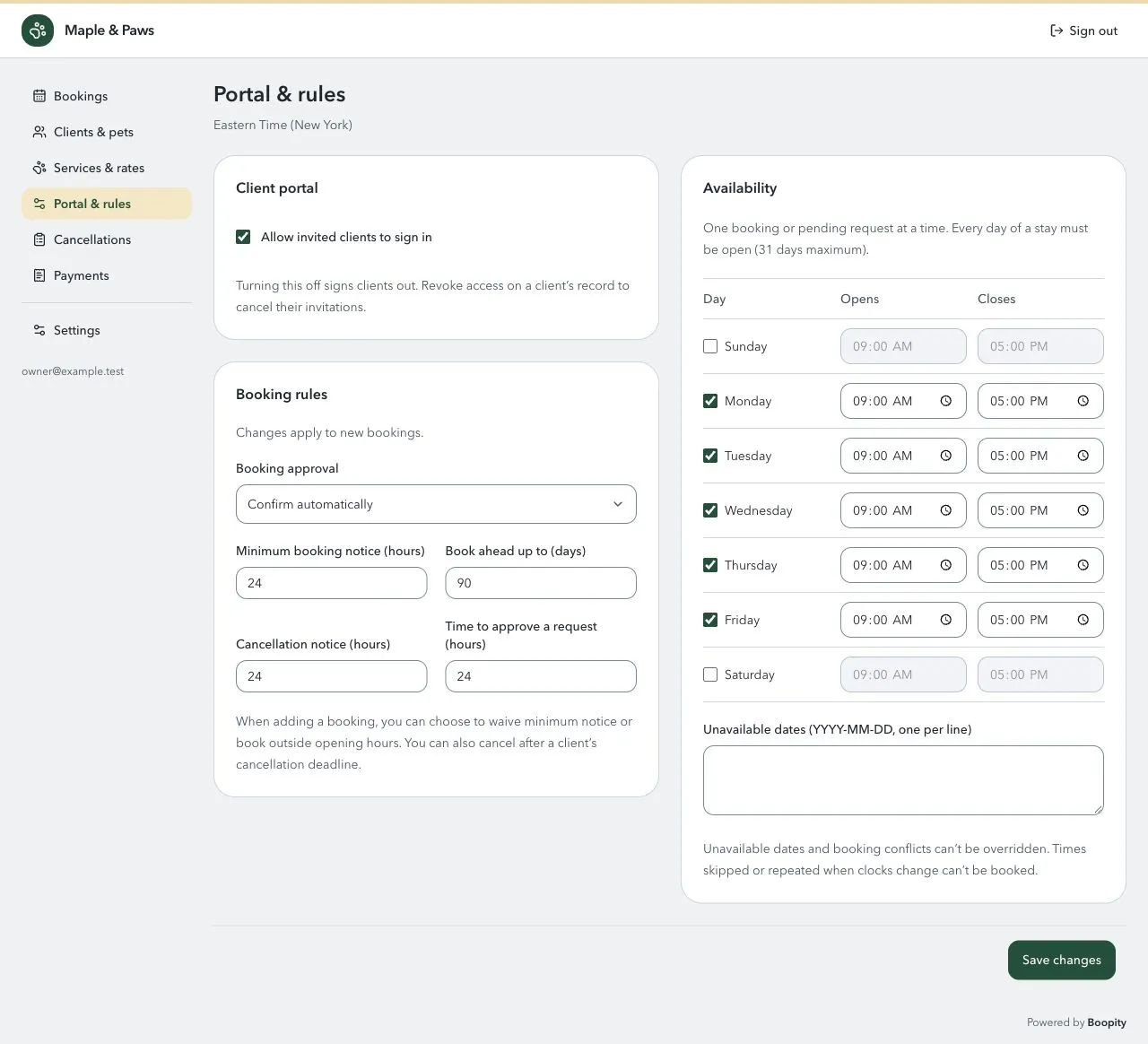
Set your weekly hours
Section titled “Set your weekly hours”Select the days you work and enter Opens and Closes for each. For example, Monday from 9:00 AM to 5:00 PM allows a 30-minute visit to start as late as 4:30 PM.
Times use the business time zone shown on the page. Change that in Settings → Appearance if it’s wrong.
For holidays or days off, enter dates under Unavailable dates, one per line in YYYY-MM-DD format. These block the whole day. Select Save changes.
Choose how far ahead clients can book
Section titled “Choose how far ahead clients can book”| Setting | Example | What it means |
|---|---|---|
| Minimum booking notice (hours) | 24 | A client must book at least a day ahead |
| Book ahead up to (days) | 90 | Dates more than 90 days away aren’t offered |
| Cancellation notice (hours) | 24 | Clients can cancel until 24 hours before the visit starts |
Set the minimum notice to 0 if you want to allow same-day bookings when a slot is free.
The cancellation rule is saved with each booking. Changing it later doesn’t rewrite the terms of existing bookings.
Approve requests or confirm automatically
Section titled “Approve requests or confirm automatically”- Review each request: you approve or decline each client request. Set Time to approve a request (hours) to choose how long its slot is held. The hold also ends if the visit’s start time arrives first.
- Confirm automatically: an available booking is confirmed as soon as the client submits it.
Bookings you enter as the sitter are confirmed immediately in either mode. Neither mode collects payment automatically.
Open the client portal
Section titled “Open the client portal”Select Allow invited clients to sign in, then save. Only invited clients can join; this doesn’t make booking open to anyone who finds your site.
You also need to offer at least one service in the portal and invite your clients.
Why a time isn’t available
Section titled “Why a time isn’t available”Check these in order:
- The selected weekday has saved opening hours.
- The whole visit fits inside those hours.
- The date meets the minimum notice and advance-booking window.
- It isn’t listed as unavailable.
- No confirmed booking or unexpired request already holds the slot.
All-day and multi-day bookings need every date in the range to be available, including the last day. They reserve those days, and a booking can span at most 31 days.
For a one-off exception to hours or notice, the sitter can use the options on New booking. See what exceptions allow.